Jul 16, 2026
·Emily Kho

A random baseball night can come together quickly. The weather turns, a friend finds an extra seat or a long workday suddenly feels better with nine innings ahead. You pull up a listing and the price looks solid, so the only question left is whether a ticket bought this close to first pitch is actually going to work.
What determines whether a last-minute MLB ticket is safe is not the timing of the purchase. It is the platform handling the order and whether you know where your tickets will appear before you leave. As the Official Ticket Marketplace of MLB, SeatGeek connects directly to the league's ticketing infrastructure, which is why our game-day buying works as smoothly as it does.
This guide covers how to buy day-of MLB tickets safely, how SeatGeek’s delivery works for last-minute MLB purchases and which tools can help you find the right seat before first pitch.
Is buying last-minute MLB tickets safe?
Yes, especially on SeatGeek when the listing is built for fast digital delivery and the checkout flow tells you exactly how entry will work. Late-listed MLB inventory is routine over a 162-game season, whether it’s season-ticket holders skipping games, groups getting smaller and sellers adjusting prices as first pitch gets closer and plans change. That is ordinary baseball inventory, not a warning sign.
Problems usually start when the sale happens somewhere with no order record, no secure ticketing process and no real support channel if something goes wrong.
What to check before you pay
The safest last-minute purchase is the one that matches your timeline. Before you complete checkout, read the delivery details on the listing so you know where your tickets will appear. Most MLB tickets purchased on SeatGeek can be accessed directly in the SeatGeek app. If the listing uses mobile transfer, you may need to accept and access the tickets through the MLB Ballpark app, Ticketmaster or another team-designated platform.
Also confirm the basics: the correct date, ballpark, section, row, ticket type and quantity. For doubleheaders or a series with multiple upcoming games, an extra second of attention here can prevent a frustrating mistake.
Why SeatGeek’s Instant Delivery matters on game day
Not every MLB listing delivers at the same speed, so Instant Delivery is especially useful when you are buying close to first pitch. While scrolling through listings, look for the lightning bolt symbol, which marks tickets that are expected to arrive within minutes of purchase. You can also confirm the delivery method in the listing details before checking out.
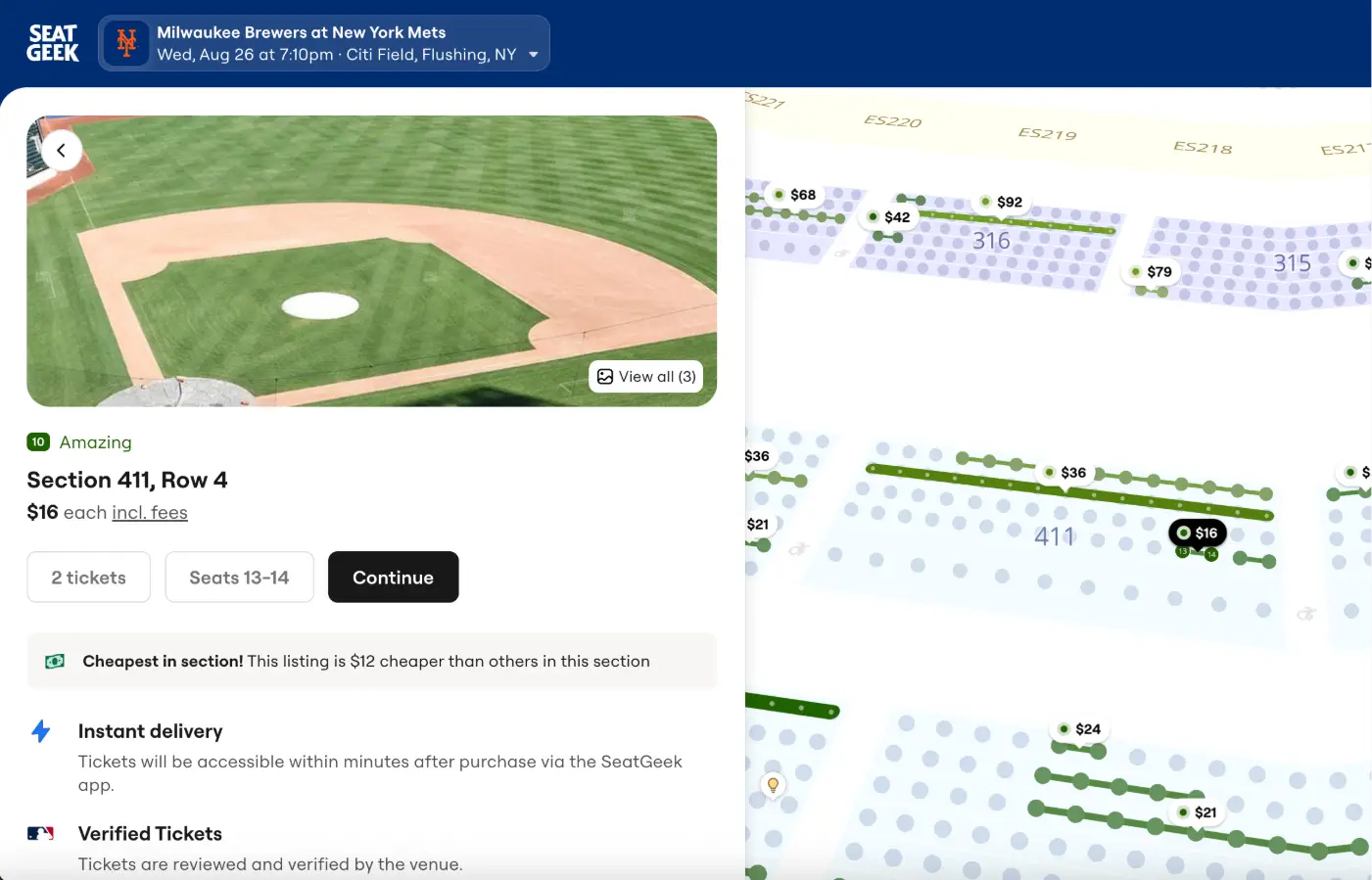
If a listing on another ticketing site doesn’t have instant delivery, it may still deliver in time, but the timeline is less predictable. When you are working against a real clock, starting your search with SeatGeek’s Instant Delivery inventory removes the biggest variable.
How SeatGeek delivery works for last-minute MLB tickets
Most MLB tickets purchased on SeatGeek can be accessed directly in the SeatGeek app. Some listings, however, use mobile transfer and require you to accept or access the tickets through the MLB Ballpark app, Ticketmaster or another team-designated platform. Checking the delivery method before purchasing tells you whether another account or app will be required.
When MLB tickets require mobile transfer
If a listing requires mobile transfer, the tickets will be delivered through the official platform used by the team or venue rather than directly through your SeatGeek account. A confirmation email without an immediate barcode is therefore not automatically a problem. It may simply mean you still need to accept the transfer or connect the email address entered at checkout to the required platform.
The delivery details shown on the listing and in your order will explain where the tickets are being sent and which steps you need to complete.
Getting tickets into the MLB Ballpark app
If your order requires mobile transfer through the MLB Ballpark app, sign in or create an account using the email address entered at SeatGeek checkout. Then open the Profile tab, tap “My MLB Account Emails” and make sure that email address is listed and verified. You can resend the verification email from that screen if needed. Once the email is verified and the transfer has been completed, the tickets should appear in the Wallet tab.
You do not need to begin from the delivery email. You can open the Ballpark app directly and complete the account setup there.
MLB Ballpark tickets use live, rotating barcodes, so screenshots are not accepted for entry.
The most important step is matching the delivery email. If the email entered at checkout is not connected to your Ballpark account, the tickets may not appear. A mismatched or unverified email is one of the first things to check when transferred tickets are missing, and it is usually preventable.
What to do if your MLB tickets are not showing up
Start with the obvious checks. Update the MLB Ballpark app to the latest version and confirm that the email address entered at checkout is listed and verified under “My MLB Account Emails.”
If the tickets still are not appearing and the game is approaching, open the order in the SeatGeek app and tap "Contact Support." Every purchase on SeatGeek is backed by the Buyer Guarantee, which covers timely delivery, valid entry, and tickets matching the order placed. If a covered issue is verified, you may receive comparable or better replacement tickets, a refund, or, where allowed, a credit.
Why SeatGeek is the best option for last-minute MLB tickets
SeatGeek’s direct integration with MLB clubs provides an important layer of security when there is little time to resolve a ticket problem. For eligible integrated MLB tickets, the listing can be verified against the club’s ticketing system. Once the ticket is sold, ownership is updated and the club’s box office issues a new, unique barcode for the buyer.
That process helps prevent an old, copied or duplicated barcode from being used by someone else. Instead of relying only on a seller to send the original ticket correctly, the buyer receives a newly issued ticket connected to the primary box office, providing greater confidence that it will work at the gate.
The rest of SeatGeek’s game-day tools help buyers move quickly. Listings marked for Instant Delivery include a lightning bolt symbol as you scroll, making it easier to identify tickets expected to arrive within minutes. The delivery method is also shown before checkout so you know whether the tickets will appear in SeatGeek or require a mobile transfer through another platform.
Deal Score rates listings from 1 to 10 by considering factors such as seat location, expected sightline, historical pricing and comparable options. When you are choosing among several seats in a hurry, it can help you identify stronger value without comparing every row and price manually.
Interactive seat maps and seating chart pages let you compare sections and views at ballparks such as Yankee Stadium, Wrigley Field, and Dodger Stadium. That is especially helpful when you are buying at an unfamiliar park on short notice.
All-In Pricing includes mandatory fees in the price shown on the event page, allowing you to compare listings using a clearer picture of the cost. Taxes, delivery charges where applicable and optional add-ons may still appear separately.
Every SeatGeek purchase is also backed by the Buyer Guarantee, which covers timely delivery, valid entry and tickets matching the order. If an eligible issue arises, support is available directly through the order in the SeatGeek app.
How to buy last-minute MLB tickets on SeatGeek
When first pitch is getting close, the priority is to confirm the right seats and finish the delivery steps before you are standing at the gate.
Here is a step-by-step guide to buying last-minute MLB tickets on SeatGeek.
Search for the MLB team or game on SeatGeek.
Confirm the correct date, ballpark, and game before selecting tickets.
Review the section, ticket type, quantity, and delivery method on the listing.
Look for listings with the Instant Delivery flag if you need tickets quickly.
Compare value with Deal Score and use the interactive seat map to check the view.
Review the total price with All-In Pricing and complete checkout.
Follow the delivery instructions immediately and open the required app before reaching the gate.
Baseball creates more same-day buying chances than almost any other sport. If today turns into a ballpark night on short notice, the most important thing you can do is to get the right app fired up before you head to the ballpark.
📁 Categories: MLB